
Public Betaarchicad addonv1.0.0-beta
Lay-it-out
Parametric Pattern Generator for Archicad
Lay-it-out is a native Archicad add-on developed specifically to eliminate the tedious manual drafting of floor tiling, paving patterns, facade panelization, and brick bonds. Rather than generating sluggish morphs or uneditable 2D fills, Lay-it-out generates clean native Archicad Slabs with accurate bill-of-materials and schedule takeoffs.
Official Distribution Package
Lay_it_out.zip
Package Size:2.99 MB
Target Host:Archicad 29
Version:v1.0.0-beta (public_beta)
Initial Public Beta complete bundle: Includes LayItOut.apx Archicad add-on, LayItOutStudio.html UI template, install lay-it-out.bat automated installer, and the complete offline Help Center documentation.
Sign In to Download (.zip)
Free account required for download
Interactive Visual Gallery & Screenshots
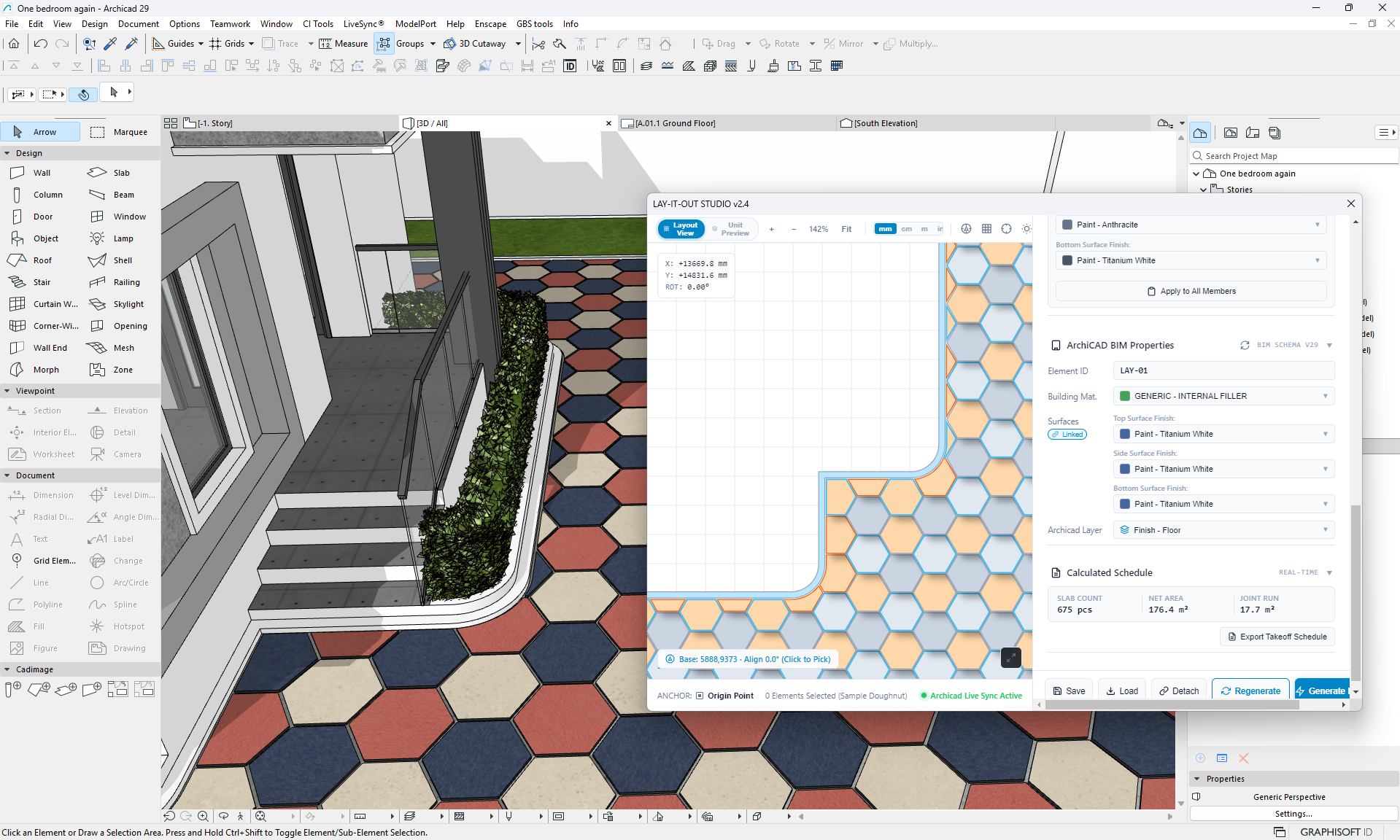
Package Integrity Check (SHA-256):
A882B24F1D2387907049027FB338D114F9B4C3E078DD04EBCAC2A50F6F8044C9
Core Architectural Capabilities
Native Archicad Slabs Every pattern piece is an authentic Archicad slab element supporting native classifications, materials, and layers.
Parametric Pattern Families Seamlessly generate Running Bond, Grid / Stack, Herringbone (45° and 90°), Basketweave, and Chevron designs.
Complex Boundary & Hole Clipping Full support for user-drawn polygon boundaries, curved edges, and courtyard / doughnut hole exclusions.
Live Dimensional Controls Precise adjustments for unit length, width, thickness, mortar gaps, perimeter offsets, and rotation angles.
BIM & Quantity Take-offs Automatic piece counts, total area coverage, edge trimming metrics, and schedule-ready attributes.
Integrated Studio HUD & Offline Help Embedded interactive visual interface with complete built-in architectural documentation.
Step-by-Step Installation Guide
- 1Close Archicad 29 before installing.
- 2Download and extract Lay_it_out.zip to a temporary folder.
- 3Run "install lay-it-out.bat" as Administrator to automatically copy all files, or manually copy LayItOut.apx and LayItOutStudio.html into: C:\Program Files\Graphisoft\Archicad 29\Add-Ons\Lay-it-out\
- 4Launch Archicad 29 and open any architectural project floor plan.
- 5Locate the new menu command: GBS tools > pattern generator > Lay-it-out
- 6Click the Help (?) button on the palette anytime to view offline guidance and pattern presets.
Registered Identifiers:
Developer ID: 879712046 | Local ID: 44043557
System & Software Compatibility
| Host App | Version | Operating System | Status |
|---|---|---|---|
| Archicad | 29 | Windows 10 / 11 (64-bit) | Verified |
| Archicad | 28 | Windows / macOS | In Development |
Known Limitations & Beta Notes
- Currently verified and compiled specifically for Archicad 29 on Windows (x64). Mac ARM64 / Archicad 28 builds are undergoing validation.
- Complex splines with hundreds of curved nodes may take longer to compute during live boundary clipping.
- Extreme scale pattern counts (> 50,000 units in a single run) should be generated by zoned polygons for optimal viewport frame rates.
Independence Disclaimer: GBS Tools is an independent software developer. Archicad and Graphisoft are registered trademarks of Graphisoft SE. GBS Tools is not affiliated with, endorsed by, or sponsored by Graphisoft.