Releaseddesktop utilityv1.0.0
DAW (Darkmode Anywhere Whatsoever)
GPU-Accelerated Dark Mode for Archicad & Windows Tools
DAW (Darkmode Anywhere Whatsoever) is a lightweight, high-performance desktop utility that brings an OLED-safe dark appearance to Archicad, CAD drafting software, and legacy tools without modifying target binaries or injecting DLLs. Built with native C++20 and Direct3D 11 shaders, it runs with near-zero latency and minimal system footprint.
Official Distribution Package
DAW.zip
Package Size:0.42 MB
Target Host:Windows Desktop Windows 10 / 11 (64-bit)
Version:v1.0.0 (stable)
Official Production Release v1.0.0: Includes standalone native C++20 DAW.exe utility and documentation.
Sign In to Download (.zip)
Free account required for download
Interactive Visual Gallery & Screenshots
Package Integrity Check (SHA-256):
A9839D6D82575A0C3E7087408D0C4C96B8210F17842D7A24D06E68904A84E438
Core Architectural Capabilities
Zero DLL Injection & Non-Intrusive Runs purely via Direct3D 11 frame capture and pixel shaders without touching Archicad binaries or risking project stability.
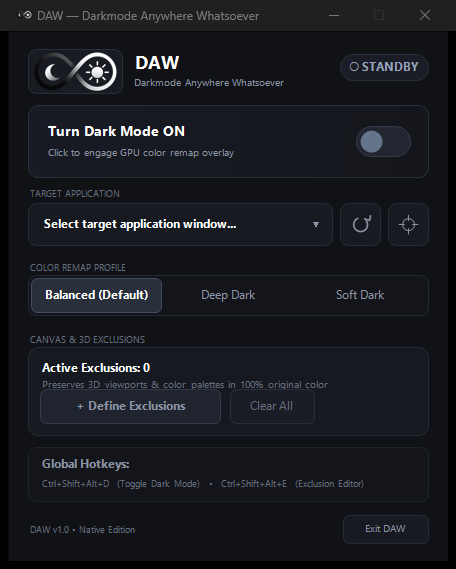
Selective Neutral Tone Mapping Smoothly transforms bright grayscale backgrounds and white menus to deep charcoal (#202020) while preserving saturated colored pens, icons, and status flags.
Interactive Viewport Exclusion Zones Draw custom exclusion rectangles over Archicad 3D models or floor plans to display true original colors.
100% Click-Through Overlay Full transparency (WS_EX_TRANSPARENT) allows uninterrupted drawing, orbiting, and shortcut usage.
System Tray & Global Hotkeys Minimizes to system notification area with instant Ctrl+Shift+Alt+D keyboard toggle and Ctrl+Shift+Alt+E for exclusion editing.
Step-by-Step Installation Guide
- 1Download and extract DAW.zip to any directory or your Program Files.
- 2Run DAW.exe directly (zero runtime dependencies or .NET runtimes needed).
- 3Select Archicad (or any target drafting window) from the dropdown list or click "Pick Window".
- 4Switch the master Dark Mode toggle to ON to activate real-time GPU shader tone mapping.
- 5To preserve colors in your 3D viewport, click "+ Add / Edit Exclusions" and drag a rectangle over the drawing canvas.
- 6Use Ctrl+Shift+Alt+D anytime to toggle dark mode globally across your workspace.
Registered Identifiers:
GBS Tools Suite Verified Binary
System & Software Compatibility
| Host App | Version | Operating System | Status |
|---|---|---|---|
| Windows Desktop | Windows 10 / 11 (64-bit) | Windows (x64) | Verified |
Known Limitations & Beta Notes
No known critical limitations logged.
Independence Disclaimer: GBS Tools is an independent software developer. Archicad and Graphisoft are registered trademarks of Graphisoft SE. GBS Tools is not affiliated with, endorsed by, or sponsored by Graphisoft.